Guide
Chat, Cowork, Code or Autopilot? A practical guide to the new Copilot
Microsoft's new Copilot puts four ways of working in one app. What each one is for, how I'd choose between them and what to try first, whether you use it, build with it or have to switch it on.

On 25 September Microsoft introduced the new Copilot. Chat and Cowork come together on one Home screen. Code lets anyone build small apps. And Autopilot is an agent that keeps working when you’re not.
That’s four ways to get work done in one app. So the question I hear most right now is simple: Which one do I use for what?
Here’s how I’d explain it to a team on a Monday morning.
Four ways to get work done
- Chat: For asking. Quick questions, lookups and first drafts, with you in the loop on every turn.
- Cowork: For delegating. You describe a task and Cowork runs it end to end across your email, calendar, Teams and documents. It hands back finished work, and it asks you to approve each action before it sends, schedules or posts anything.
- Code: For building. Describe an app, tracker, dashboard or automation in plain language and Copilot builds it. It runs on the same underlying technology as GitHub Copilot, in a sandbox, and can be hosted inside your company’s Microsoft 365 tenant.
- Autopilot: For handing over. A persistent agent with its own identity, memory and workspace. Give it a name, a role and a goal, and it watches channels, follows up on threads and runs recurring work without waiting for a prompt. It’s in private preview for now.
Microsoft says that soon you won’t have to choose. You’ll just say what you need and Copilot will route the work to Chat, Cowork or Code. Until then, the choice is yours.
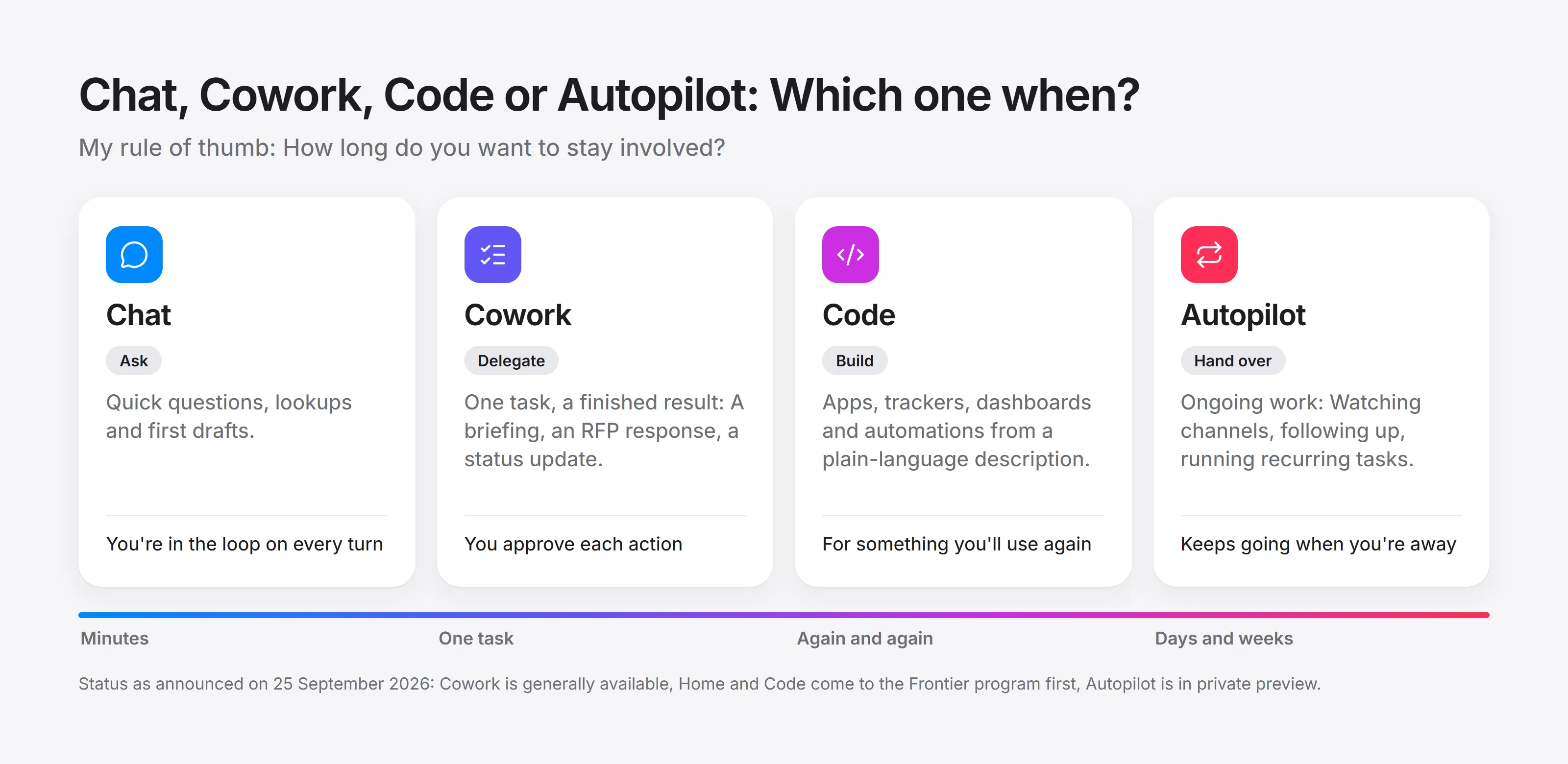 Which one when. Status as announced on 25 September 2026.
How I’d choose
My rule of thumb is about how long you want to stay involved.
- Seconds to minutes, and you’re there the whole time: Chat.
- One task with a clear finished result: Cowork. A customer briefing, an RFP response, a status update built from last week’s mails and meetings.
- Something you’ll use again and again: Code. If you rebuild the same spreadsheet every week, that’s a small app waiting to happen.
- A responsibility that runs for days or weeks: Autopilot. Chasing updates before a review, keeping an eye on a channel, keeping a recurring process moving.
A quick test I use. If you’d give a colleague a task, that’s Cowork. If you’d give them a responsibility, that’s Autopilot.
Five things to try this month
- Pick one weekly task for Cowork: Choose something you already do every week with a clear result, like the Friday status update. Start there, not with the hardest thing on your list.
- Write the brief like you would for a new colleague: The goal, which sources to use, what the result should look like and when you need it. Vague in, vague out.
- Read the plan before you approve: Cowork shows each step while it works and asks before it acts. That’s where you catch a wrong assumption early.
- Turn your most-copied spreadsheet into an app with Code: A tracker or dashboard you rebuild by hand is the perfect first project. Keep it small and personal before you share it with the team.
- Write down what you’d hand to Autopilot: It’s only in private preview so far, so most of us can’t try it yet. Use the wait to list the recurring follow-ups that eat your week. That list is the job description for your future digital teammate.
For the admins
- Cowork is off by default: Admins decide when to turn it on and who gets access. It needs a Microsoft 365 Copilot licence and is then billed by usage, per task. Set spending limits and usage alerts before you open it up.
- Nothing usage-based starts by itself: Cowork and Code run on usage-based billing with Copilot Credits, on top of the Copilot licence. For enterprise customers they stay off until an admin creates a spending policy in the Microsoft 365 admin center, and nothing is billed before that. Cost management in Agent 365 now covers Code as well as Cowork, and users can see their own credit usage in Copilot.
- Frontier comes first for Home and Code: Both roll out through the Frontier program before broad availability. If you want to try them early, that’s the way in.
- Autopilot isn’t ready to switch on: Microsoft announced it as a private preview from the end of September, so most organisations can’t use it yet. Don’t plan a rollout or promise it to your users. What Microsoft has shared so far: It lives in your tenant with its own identity, memory and workspace. It works in Teams and Outlook, with permissions, audit and governance behind it. And it runs on usage-based billing, like Cowork and Code.
- Apps need a home: Copilot Managed Runtime, now in public preview, hosts the apps people build in Cowork, Code and Copilot Studio inside your Microsoft 365 tenant. You get Microsoft Entra sign-in, your connector policies and one app inventory in the Microsoft 365 admin center.
- Plugins get one catalogue: The new plugin registry brings Microsoft, partner and custom-built plugins together in one place, and IT approves and manages them centrally.
My take
One line in Microsoft’s announcement stuck with me. For years the unit of knowledge work has been the file: The document, the spreadsheet, the deck. Code adds a fourth, which Microsoft describes as “small, purpose-built solutions anyone can create to get a job done.”
That matches what I see in the room. At an HR hackathon in September, more than 60 HR colleagues spent a day building, and by the end the room was full of first agent prototypes. Two comments I overheard say it all: “This is easier than I thought” and “Wow, it actually works.”
So the technology is getting out of the way. The skill that matters now is describing the work clearly and deciding what you actually want to hand over. The road from AI user to AI builder just got a lot shorter.
Microsoft says there’s more to come at Ignite, 17 to 20 November in San Francisco and online. Plenty to try before then.
Which one are you most curious about: Cowork, Code or Autopilot? And what’s the first thing you’d hand over? I’d love to hear it.
Sources
- Introducing the new Copilot with Home, Code and Autopilot, Official Microsoft Blog, 25 September 2026
- Copilot Cowork is now generally available, Microsoft Copilot Blog, 16 June 2026
- Copilot Cowork overview, Microsoft Learn, updated 29 September 2026
- Evolution of the Copilot pricing model, Microsoft Copilot Blog, 25 September 2026
- Build where you want, run with confidence: Copilot Managed Runtime, Microsoft Copilot Studio Blog, 25 September 2026